Showing posts with label Tools. Show all posts

ZDbox (All-In-One toolbox) v2.3.132 Apk

By admin | Monday, December 22, 2008 | 0 comments


ZDbox (All-In-One toolbox) v2.3.132 Apk
Size : 3.3 MB
Requires Android:1.5 +
Android Market Link - Visit
Developer - Visit

v2.3.132 change log:
1.Add DND countdown,it's more convenience when you have a meeting or taking a nap.
2.Add history eraser,protect your secret without a trace.
3.Add power saver,extended your battery life.
4.Optimized the antialias on some mobile mode.

ZDbox is an amazing all-in-one toolbox. Five stars in xda forum.

ZDbox is an amazing and free all-in-one toolbox. It holds a collection of useful tools and has a nice and easy to use interface. With ZDbox you’re getting your mobile/cell phone under control, do easily some optimization and customize it to your needs. An essential tool which you will love! 5 stars in xda forum.

★ Widgets: Keep screen always on, kill all tasks, WiFi on/off, airplane mode on/off, brightness adjustment, sound settings, rotate screen on/off, bluetooth on/off, start/stop sync, switch between 2G/3G, app lock on/off, GPS on/off, APN on/off (mobile access point), flashlight on/off

★ Battery: Monitoring and showing lots of information about remaining battery time, temperature, health, time since last boot, necessary time until full charge and so on

★ Traffic counter: Monthly/daily mobile data usage overview, shows remaining data traffic, detailed data usage information for each app.

★ Do not disturb: Just set days and the time when you need your privacy and you won’t be disturbed by your phone. Set phone to silent, vibration or airplane mode.

★ App lock: Protect apps with a password or pattern, for exmaple your contacts, Facebook, Twitter, Gmail and so on

★ Task killer: Kill all apps at once, define protected apps which won’t be killed, set auto kill when screen gets locked, mark single or multiple apps to kill

★ Notification bar: One tap on the bar shows remaining battery time, running apps, how much data traffic is left and if app lock is active or not. A tap on these informations starts ZDbox.

★ Uninstaller: Shows used/available internal and SD card memory. Apps can be easily uninstalled. Single or multiple (batch) uninstall possible.

★ App to SD: Move apps to your SD card. Single or multiple (batch) move possible. Only for Android 2.2 and 2.3.

•Cache cleaner:
With Cache Cleaner you can clean your cache fast and easily.With auto cache cleaner ,
you don't need manual operation by yourself everyday.ZDbox is your best scavenger,free your phone's memory,make it as light as a feather.


Download

Adobe AIR 3.1.0.556 Apk

By admin | Sunday, December 21, 2008 | 0 comments


Adobe AIR 3.1.0.556 Apk
Size : 8.2 MB
Requires Android:2.2 +
Android Market Link - Visit
Developer - Visit

v3.1.0.556 change log:
- Adobe AIR 3.1.0.556 for Android includes compatibility with Android 4 supported devices, performance improvements and bug fixes related to security and stability. The complete set of release notes can be found at: http://adobe.ly/s16mAX.

Enjoy your favorite web applications with Adobe AIR.
Adobe AIR enables you to have your favorite web apps with you all the time. AIR apps run on your device without a browser, providing the convenience of a native app. You can learn more about AIR at http://adobe.com/go/airmobileinfo. See what the most popular AIR apps are right now at http://www.appbrain.com/apps/popular/adobe-air/.

Download size of AIR is compressed to 8.3MB. When installed, the binary is uncompressed to 24.4MB on the device. You also have the option to move Adobe AIR to the SD Card. The amount of data that can be moved is dependent on your OS version.
By clicking "Install", you agree to the Software License Agreement found at http://adobe.com/go/eum.

Adobe AIRAdobe AIR

Download

GO Locker 1.07 Final Apk

By admin | Saturday, December 20, 2008 | 0 comments


GO Locker 1.07 Final Apk
Size : 861 KB
Requires Android:2.0 + / Go Launcher
Android Market Link - Visit
Developer - Visit

v1.07 change log:
1. (Improve) Fix most of "double lock" bugs
2. (Improve)Open "My locker" when click the GO Locker icon in app drawer
3. (Fix) Some other bugs

GO Locker,design to GO Launcher EX is the most simple locker for Android!
Notice! Here comes the version of GO Locker.

====Features:
1. Cool Locker Screen that makes your phone outstanding;
2. Good compatibility with GO Launcher EX and it is stable;
3. Easy to use;
4. Able to activate phone, SMS and Camera directly;
5. Various of Locker Themes to match your style;
6. Emergency unlock enabled;

====Tips:
1. Make sure GO Launcher EX V2.58 or above has been installed;
2. Click “MENU—-Preferences—-Theme Settings—-GO Locker” to use it after installed;
3. Click “My locker” to preview and Download more Locker themes;
Please let me know if you meet any bugs or want any improvement!
E-mail: golauncher@goforandroid.com


Download

Android Assistant(18 features) v3.4 Apk

| 0 comments


Android Assistant(18 features) v3.4 Apk
Size : 1.7 MB
Requires Android:2.0 +
Android Market Link - Visit
Developer - Visit

v3.4 change log:
- Add app backup and restore
- Fix some phone GPS's bug
- Fix paypal donate
- Fix batch uninstall
- Move the battery info location

Top 18 features to help you easily and efficiently manage your android phone.

Android Assistant is one of the most powerful and comprehensive management tools to improve your android phone's performance. It speeds up your phone's running speed and saves battery.

【Top18 features】
1. Monitor status (cpu, memory, battery)
2. Process Manager (Auto Boost and Quick Boost can distinguish different types of processes thus will not kill fatal system processes and apps in Ignore List.)
3. Cache Cleaner
4. System Clean(Browser History, Clipboard, Market History, Gmail History, Google Earth History, Google Map History)
5. Save Battery Settings(bluetooth, wifi, gps, auto-sync, orientation, haptic feedback, screen brightness, timeout)
6. File Manager
7. Startup Manager
8. Batch Uninstall
9. Battery use
10. Volume Control
11. Ringer
12. Startup Time
13. Startup Silent(Menu->Settings->Startup Silent)
14. System Info
15. Widget(Quick Booster[1,4], Shortcuts[4])
16. App 2 SD(Support android2.2 and later):Get more free internal phone storage space
17. Batch Installation
18. App backup and restore


Download

Battery Dr saver + a task killer 3.4.3 Apk

By admin | Thursday, December 11, 2008 | 0 comments


Battery Dr saver + a task killer 3.4.3 Apk
Size : 1.1 MB
Requires Android:1.6 +
Android Market Link - Visit
Developer - Visit

v3.4.3 change log:
About write Browser's history and bookmarks permission: the "History cleaner"(Menu->History cleaner) function need it.
1.Change the launcher icon .
2.fix 1 bug on os 1.6
3.Replace some images.
4."Select Language"function
5.History cleaner:(needs browser history permission)
6.Fixed some German translation mistakes.
7.Remove the read phone permission
8.Remove the GPS permission.
9.Wait for 10-15 minutes when power is 100%,then you will get a "Full charge".

Extend your Battery life.

About write Browser's history and bookmarks permission: the "History cleaner"(Menu->History cleaner) function need it.

Old name:Battery Doctor to Save Battery or Battery saver.
If it forces close,please Clear the data of Battery Dr on the "Manage Applications" screen or uninstall and reinstall it.

★---Extend your Battery life---
Do you want to make your battery stronger?Dr.Battery can help you to save power.Download the battery app now!
Improve your Battey life!Max your Battery life.Make your phone faster and smoother.
✔Help you to kill tasks quickly and reset your phone easily!
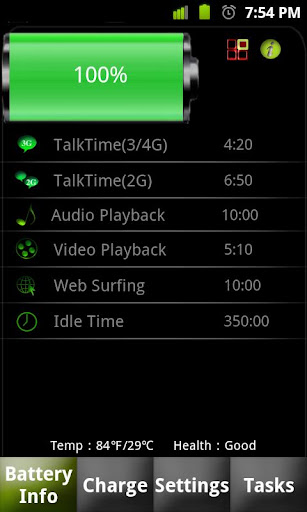
✔Show battery health,temperature,talktime etc.
✔To improve your phone's battery,you should kill running tasks,adjust screen brightness(volume),turn off wifi, gps, bluetooth,Auto-sync etc.
✔Battery Dr saver is the best Battery Improver/Battery Booster/battery saver tool.As your Battery Helper,it helps you to improve battery life .
✔Icludes: Power Management(Battery Management),Battery Notifier, Battery Monitor,Power Control,task killer.

★---Battery Information/Battery Watcher---
Displays the battery status, battery information and so on.
✔Displays the health and the temperature of the battery.
✔Full charge alarm
✔Show Battery Usage
✔Battery Time displays the remaining time(battery's running time) for:TalkTime(2G/3G/4G),AudioTime,VideoTime,Web Surfing Time and Idle Time.
✔Battery indicator
✔Reset Battery Profile

★---About Full Charge---
✔1:Be sure that your battery power is less than 20%,and then launch this app and plug the charger cable.
✔2:Recharge your battery directly to 100% with no pause.
✔3:It will alert you when charging is complete.

★---Settings:---
With the Settings,you can extend Battery Life(boost Battery Life).It improves your Battery Performance.
✔Set screen timeout time
✔Volume control:Ringer volume,Notification volume,Media volume,Alarm volume,Voice call volume,System volume.
✔Set screen brightness.
✔Ringer control:Silent mode,Vibration mode,Sound only mode.
✔GPS receiver/ GPS setting
✔2G/3G toggle(mobile data)
✔Set Wi-Fi/wifi,Bluetooth,Auto-sync data,Airplane mode
✔Set Wi-Fi hotspot for 2.2(does not support some USA users if your Carrier charges for it)

★---Task Killer/advanced task manager---
The task killer like ATK allows you to kill processes on your Android quickly . The best process manager.
✔Simple,quick to use
✔Memory booster/ram booster.
✔Ignore list
✔Show the memory
✔Notification in the status bar
✔one-click task killer widget
✔app manager:Switch to/Detail/Uninstall apps.

★---Other functions---
Search history eraser(history cleaner):
1 click to clear search history and all cached files.
1 tap to erase history data ,delete web Browser history,clipboard data etc. Cleanup your phone.


Download Or Download

File Expert 4.0.4 Apk

By admin | Sunday, December 7, 2008 | 0 comments


File Expert 4.0.4 Apk
Size : 1.9 MB
Requires Android:2.1 +
Android Market Link - Visit
Developer - Visit


v4.0.4 update:
1. Improved German and Hungary language translation
2. Improved sorting policy. Now folders will put in the first position in all sorting methods
3. Show more info on Get New Apps
4. Performance optimization
5. Add a new cloud storage service provider Kanbox, we will support more cloud storage services in the near future!

Powerful File Manager/WIFI File Transfer Web & FTP/App Manager - ALL in ONE
Best & Leading Android file manager of all time with enhanced WIFI sharing and management, root explorer and Bluetooth support! More than 6 millions of users worldwide and still fast growing! Join us today!


* All basic file operations - Copy, Paste, Move, Create and Rename your files and folders
* FTP/HTTP Server - Share & Manage your files without a USB cable, just like with Web Sharing or WIFI File Explorer, but we do even more because we can provide both Web & FTP transferring support. Web management featuring a Windows style interface!
* Root access to system folders and files like Root Explorer. Remount those locations to read write. Requires rooted phone to function. This feature is in BETA testing. Use it on your own risk.
* SMB, FTP, SFTP and FTPS Client - Access your host computer from your phone, using your phone to manage your PC via WIFI with SMB, FTP, SFTP or FTPS
* Bluetooth - Sharing your files over Bluetooth OBEX FTP. Send any files via Bluetooth OPP
* NFC Support. You can use NFC-enabled phone to transfer files and apps.
* WiFi Send. Directly send files via WiFi between File Expert powered phones
* App Manager - Uninstall/Backup apps. We know that many apps on the market can do this, but none can do this work silently. We're the ONLY app that can install and uninstall apps silently, which makes your batch process faster and cooler. Silent capabilities require a rooted phone to function.
* Archive manager - Create and decompress ZIP archive, Decompress RAR. You can view your ZIP/RAR/GZIP/TAR/TGZ/BZ file just like accessing a folder and directly decompress unique files and folders
* Thumbnails - supports jpg/png/mp3/mp4/3gp thumbnails
* Text Viewer
* Image Viewer - supports both local and remote folder
* Search SD card, perform operations on search results
* Help your player to play media that stores on SMB share (your player needs to support HTTP streaming). WE are the ONLY file manager that can directly open some types of videos over SMB network
* File Picker - Let FE to help you anywhere you want :)
* Theme support - Choose themes that you love for FREE!

Why choose FE? Here are the reasons:
1. No ADs and it's FREE
2. Gives you almost everything you need to manage your phone's resources
3. Smaller size than competitors like ES and Astro
4. Acceptable performance
5. Free technical support via email
6. Clear User Interface, and most operations can be done only in touch
7. The ONLY file manager that supports both PC 2 phone & phone 2 PC wifi file transfer and can directly play some videos and music via SMB
8. Root access support
9. Themes

We know that Astro is great but you have to buy Pro version in order to remove annoying ADs. We can provide all functions that Astro does and offer you even more useful features like Web sharing support. Why not give us a try?


Download

File Expert 4.0.2 Apk

By admin | Friday, November 28, 2008 | 0 comments


File Expert 4.0.2 Apk
Size : 1.9 MB
Requires Android:2.0 +
Android Market Link - Visit
Developer - Visit


v4.0.2 update:
1. Fix sorting issue
2. Fix an issue that cannot edit file permission if work on rooted phone
3. Correct German language translation
4. Add an option on settings which can auto backup newly installed apps
5. Add an option on settings which allows users to choose default startup tab
6. Show app version on My Apps
7. Fix an issue on opening RAR files
8. Support to set image file as wallpaper
9. Fix an issue that cannot display MENU button on Honeycomb or above version

Powerful File Manager/WIFI File Transfer Web & FTP/App Manager - ALL in ONE
Best & Leading Android file manager of all time with enhanced WIFI sharing and management, root explorer and Bluetooth support! More than 6 millions of users worldwide and still fast growing! Join us today!


* All basic file operations - Copy, Paste, Move, Create and Rename your files and folders
* FTP/HTTP Server - Share & Manage your files without a USB cable, just like with Web Sharing or WIFI File Explorer, but we do even more because we can provide both Web & FTP transferring support. Web management featuring a Windows style interface!
* Root access to system folders and files like Root Explorer. Remount those locations to read write. Requires rooted phone to function. This feature is in BETA testing. Use it on your own risk.
* SMB, FTP, SFTP and FTPS Client - Access your host computer from your phone, using your phone to manage your PC via WIFI with SMB, FTP, SFTP or FTPS
* Bluetooth - Sharing your files over Bluetooth OBEX FTP. Send any files via Bluetooth OPP
* NFC Support. You can use NFC-enabled phone to transfer files and apps.
* WiFi Send. Directly send files via WiFi between File Expert powered phones
* App Manager - Uninstall/Backup apps. We know that many apps on the market can do this, but none can do this work silently. We're the ONLY app that can install and uninstall apps silently, which makes your batch process faster and cooler. Silent capabilities require a rooted phone to function.
* Archive manager - Create and decompress ZIP archive, Decompress RAR. You can view your ZIP/RAR/GZIP/TAR/TGZ/BZ file just like accessing a folder and directly decompress unique files and folders
* Thumbnails - supports jpg/png/mp3/mp4/3gp thumbnails
* Text Viewer
* Image Viewer - supports both local and remote folder
* Search SD card, perform operations on search results
* Help your player to play media that stores on SMB share (your player needs to support HTTP streaming). WE are the ONLY file manager that can directly open some types of videos over SMB network
* File Picker - Let FE to help you anywhere you want :)
* Theme support - Choose themes that you love for FREE!

Why choose FE? Here are the reasons:
1. No ADs and it's FREE
2. Gives you almost everything you need to manage your phone's resources
3. Smaller size than competitors like ES and Astro
4. Acceptable performance
5. Free technical support via email
6. Clear User Interface, and most operations can be done only in touch
7. The ONLY file manager that supports both PC 2 phone & phone 2 PC wifi file transfer and can directly play some videos and music via SMB
8. Root access support
9. Themes

We know that Astro is great but you have to buy Pro version in order to remove annoying ADs. We can provide all functions that Astro does and offer you even more useful features like Web sharing support. Why not give us a try?


Download

One Touch Battery Saver 1.9 Apk

By admin | Tuesday, November 4, 2008 | 0 comments


One Touch Battery Saver 1.9 Apk
Size : 705 KB
Requires Android:1.6 +
Android Market Link - Visit
Developer - Visit

v1.9 update:
- New features of “One Touch Battery Saver” : touch battery saving button to turn Battery saving mode on/off. Turn off Battery saving mode to resume the previous mobile status before battery saving.
- Green indicates battery saving mode off.Yellow indicates battery saving mode on.

A brand new experience on battery saving - One Touch Battery Saver!
New features of "One Touch Battery Saver" : touch battery saving button to turn Battery saving mode on/off. Turn off Battery saving mode to resume the previous mobile status before battery saving.

Green indicates battery saving mode off.Yellow indicates battery saving mode on.

One Touch Battery Saver is an app that saves the battery time of your phone! When battery runs low, just tap the app to turn on the battery saving mode (default saving mode includes switching off WiFi, bluetooh, GPS, background light, ringtone, vibration, and synchronization.)

One Touch Battery Saver: just touch battery saving button (or widget switch) to turn Battery saving mode on/off, green means normal status, yellow means battery saving mode on.
Touch the battery saving button again to resume the previous mobile status before battery saving.

Comparing to simliar apps, "One Touch Battery Saver" is easy to use without complicated settings and operations. It's stylish with simple interphase!
It comes with 2 sets of widget, just tap on the widget to turn it on! Fast and easy!

Widget Style:
1x1 One simple tab, just tap to turn on the saving mode.
2x1 A stylish widget, with one touch to turn on the saving mode. The changing sunflower shows the battery status, makes your screen more interesting and fun!

Functions:
*Battery Monitor, clearly shows the status of battery life and usage.
*Switching & managing Wifi, bluetooth, GPS, background light, sound, synchronization in one touch, saves battery with efficiency.
*Self-Customized Saving Mode, user can adjust the battery saving setting freely to fit each one's needs.
*Battery Usage Setting, will adjust the battery usage status automatically to monitor the battery life more accurately.
*3 different battery models to choose, to fit your needs and style.
*Tab widget: comes with 2 styles (1x1, 2x1), different styles of widget allow you to turn on the app with one tap! Easy and fast!


Download Or Download

Barcode Scanner 3.7 Apk

By admin | Monday, November 3, 2008 | 0 comments


Barcode Scanner 3.7 Apk
Size : 587 KB
Requires Android:1.5 +
Android Market Link - Visit
Developer - Visit

v3.7 update:
- Added support for the Motorola Xoom and other tablets.
- Added the ability to type in text and encode it as a QR Code.
- Added support for many more locales for web search and product search.
- Provided a choice of creating a new contact or merging with an existing one.
- Allowed third party apps to specify the size of the scanning rectangle.
- Added Hebrew translation and improved others.
- Fixed a crash with WiFi codes.

Scan barcodes on products then look up prices and reviews. You can also scan Data Matrix and QR Codes containing URLs, contact info, etc.
Also share your contacts, apps, and bookmarks via QR Code. This is why contacts permissions are needed.


Download Or Download

Power Bubble – spirit level 1.0.6 Apk

By admin | Sunday, November 2, 2008 | 0 comments


Power Bubble – spirit level 1.0.6 Apk
Size : 3.0 MB
Requires Android:2.1 +
Android Market Link - Visit
Developer - Visit

v1.0.6 update:
- fixed some force closes

Best bubble level for your Android phone.
PowerBubble is bubble level you have been looking for. Just look at it! It’s beautiful, functional and easy to use - indispensable tool on every smartphone. It uses accelerometer to help you test (almost) any object for plumb/level.

Application is free.

PowerBubble features
- slick graphics,
- nice physics,
- LCD display that shows numeric angle with or without decimals,
- ease of use (tips are shown on LCD),
- independent calibration for all four sides of the phone,
- angle locking with gesture or click,
- full screen mode,
- orientation locking (landscape, portrait on every device and reversed landscape, reversed portrait on 2.3+)
- sound effects - 0° angle notification with gentle beep,
- ads that can be disabled in free version (you choose if you want to support us),
- installation on SD.

Donations
If you like this application please consider donating through PayPal. It will help us make for a living and will be a nice indication that you like our work.
Facebook
Like us on Facebook: http://www.facebook.com/BoyCoyMobile
We want to here from you!

Boy-Coy’s mission
We believe that Android community deserves best. We are committed to creation of highest quality mobile apps man can imagine!

Know limitations
Some phones have very inaccurate accelerometer. If you feel that showing decimals is unnecessary you can limit measurements to integers from application settings.

Bugs
We put a lot of effort to provide you with best user experience possible. Nevertheless, mistakes happen. Feel free to report any bugs you may notice. We will be glad to hear from you.
Other

Application uses internet connection for anonymous usage statistics (it can be turned off).


Download

App 2 SD Free (move app to SD) 2.40 Apk

By admin | Thursday, October 30, 2008 | 0 comments


App 2 SD Free (move app to SD) 2.40 Apk
Size : 332 KB
Requires Android:2.2 +
Android Market Link - Visit
Developer - Visit

It is the Free App 2 SD Application with full function available in Pro version. It is an Ad Supported version. If you dont like to see ad ..just Disable your GPRS and WiFi it will not show any Ads.

v2.40 update:
★ new function to export app list to the SD card. Settings > Export
★ new function to identify the apps that won't work or behave as expected if you move them to the external storage. Long-press the app icon and then select the "Lower-right icon?" menu item for details
★ new required WRITE_EXTERNAL_STORAGE permission for saving the export app list to the SD card
★ Russian & Spanish localization

App 2 SD helps you to get more free internal phone storage space
Are you running out of application storage?

Do you hate having to check each and every app if it supports moving to the SD card?
Do you want an app that automatically does this for you and can notify you when an app can be moved?

App 2 SD streamlines the movement of applications to on your device's external or internal storage through your device's Settings. With this handy app, you'll have more control over your ever expanding collection of apps. This app is crucial to anyone who has memory management issues.

★ View all SD card capable apps and move them seamlessly
★ notify if movable apps installed
★ 1-tap to clear all app cache
★ home screen widget shows cache and available size
★ show app cache/data/code/total size
★ keep track of total and available storage space
★ sort through apps stored on phone and SD card
★ add movable apps to the ignore list
★ move apps back to the internal storage
★ view app on Market
★ uninstall app
★ open app
★ show app details page
★ support "Move2SD Enabler"
★ customizable notification sound, vibrate and light

This app is not used to backup apps to SD card. It only helps you to move a portion of apps used space to SD card. You have to manually install the apps after switching to a new phone or hard reset.

If app uses any of the following features, it cannot be installed on the external storage. It's required by Android system.
App Widgets,
Services,
Input Method Engines,
Live Wallpapers,
Live Folders,
Alarm Services,
Account Managers,
Sync Adapters,
Device Administrators

App shortcuts will disappear from the home screen after you move apps to the SD card. It's the limitation of Android system.

The following devices do not support the "App 2 SD" function:
* tablets that runs Android 3.x

Users report the following devices do not support the "Clear all cache" function:
* HTC Thunderbolt if you don't update OS to 2.3.4, GRJ22 build or later
You have to install this app on the phone storage if you want to use the widget function. It's required by Android.

We have been selected as a Google I/O 2008 Developer Sandbox partner, for its innovative design and advanced technology.

Credits:
Russian localization - Павел Алексеев
Spanish localization - Lahiri López


Download

Root Uninstall 1.4.0 Apk

By admin | Wednesday, October 29, 2008 | 0 comments


Root Uninstall 1.4.0 Apk
Size : 374 KB
Requires Android:1.6 +
Android Market Link - Visit
Developer - Visit

Simplist and fastest uninstall tool for android.
Uninstall both system and user applications.

Features
*Batch uninstall
*Fast uninstall by one click
*Show app info
*Batch back up app
*App manager
*Launch app
*Install app from backedup app


Download Or Download

Elixir 2 Donate 2.5.2 Apk

By admin | Tuesday, October 28, 2008 | 0 comments


Elixir 2 Donate 2.5.2 Apk
Size : 3.3 MB
Requires Android:2.1 +
Android Market Link - Visit
Developer - Visit

Do you want to know everything about your device? Try Elixir 2 and its widgets!
Elixir 2 is a system information application with highly configurable widgets.

Wanted: is a graphic artist out there who could create nice free icons for widgets to look better?

What's in this version:
- Next alarm widget: opens the alarms screen instead of date settings
- Reboot toggle: choice list a new Shutdown option
- Statusbar icon can display internal storage usage
- Device information: the telephony row can display information about WiMAX network if available
- Running processes: processes can be ordered by network traffic or current network traffic
- Displays information available in Android 3.*
- Bugfixes (statusbar widget refresh problem fixed)
- details: http://bartat.hu

Features:
- open system screens easily from one place
- displays information about battery, internal and external storage (sd card), cpu, memory, telephony, wifi, bluetooth, location, display, airplane mode, synchronization, audio, camera, camcorder, input devices, build, operating system, settings, configuration, clipboard, environment variables, features, java system properties, shared libraries
- change settings (brightness, screen timeout, volume, ringer mode), do actions (mount/unmount sd, clear cache, start bluetooth discovery, view location, ...), turn things on/off (apn, wifi, bluetooth, auto-brightness, rotation, ...) on information screen
- displays installed applications: code, data and cache size, network traffic; launch, uninstall, clear cache, move to sd, organize applications by labels
- displays running processes / services / tasks: pid, cpu usage, memory usage, total cpu, network traffic, view logs of a process, kill background processes
- displays output of the top linux command
- shortcuts to widgets, application labels or Elixir screens
- statusbar icon can display memory/battery/cpu/internal storage via circle/bar/percent/elixir/transparent icons
- displays sensor information, turn sensors on/off, microphone
- generating and sending reports
- view online documentation from the app
- displays logcat/dmesg logs

Widgets:
- multiple widget sizes, each can be disabled
- small widget icons, up to 7*7 icons per screen.
- open widget from shortcuts, put to the notification area or to the home screen.
- widget performance screen
- customize widget icons by icon packs
- various widget backgrounds, custom color, custom background image, changeable transparency
- different icon sizes
- change label position/color/size, hide labels
- backup/restore widget definitions
- change image, label, refresh rate of widget types

Widget icon types:
- application launcher
- contact
- shortcut: bookmark, contact, setting, ...
- battery
- battery current
- battery temperature
- internal storage
- external storage
- cpu usage
- cpu frequency
- cpu usage * frequency
- memory
- running applications count
- e-mail unread count: gmail or any imap server
- missed calls count
- messages unread count
- time
- uptime
- date
- next alarm
- mobile signal strength
- mobile traffic
- wifi signal strength
- wifi traffic

Widget toggles:
- apn
- wimax (4g)
- wifi
- wifi ap (hotspot)
- usb tethering
- bluetooth (2 or 3 state)
- gps
- airplane mode
- auto-brightness
- brightness (can set levels)
- auto-rotate
- lock
- screen timeout (can set levels)
- screen
- auto-sync
- sync all
- speakerphone
- ringer mode
- sd mount
- sd refresh
- usb mass storage
- flash (needs TeslaLED Flashlight)
- volume
- mute
- reboot (for rooted devices, normal/recovery/bootloader/shutdown)
* shortcut: bookmark, contact, setting, ...

Languages:
- english
- magyar
- русский
- deutsch
- ελληνικά
- polski

Contact: bartadev@gmail.com
Site: http://bartat.hu
Translation: http://crowdin.net/project/elixir
Facebook: http://www.facebook.com/pages/Elixir-for-Android/184000368307643


Download Or Download

AdFree Android v0.8.29 Apk

| 0 comments


AdFree Android v0.8.29 Apk
Size : 466 KB
Requires Android:2.1 +
Android Market Link - Visit
Developer - Visit

THIS APP IS FOR ROOTED PHONES ONLY!
AdFree removes most ads in the browser and other apps. It does this by nullifying requests to known host names in the system hosts file.

If you have problems with this app, or you know of additional host names not being filtered, please comment in xda-developers.com forum so it can be fixed!

What's in this version:
0.8.0 Added background image...
0.8.1 Fixed some bugs...
0.8.2 Added Mongoose, mini web server, and tcpdump to sniff DNS requests...
0.8.3+ Fixed authentication bugs/problems, force closure bug...
0.8.6 Fixed donation link
0.8.7 Added code to silently update the host file
0.8.9+ Added Japanese, Spanish translation
0.8.12 Hopefully fixed some IO errors
0.8.13 Added screen to view logged host names, clicking on a host name will open a browser with the host name on the adfree website, fixed display issue with check boxes
0.8.14 Start TCP dump if enabled when network connection is established
0.8.15 Fixed checkbox bug
0.8.17 Hopefully Fixed orientation issues
0.8.20/21 Fixed support for low dpi devices (< 160 dpi)
0.8.22+ Added Spanish translation
0.8.26+ Added Hebrew, Korean translation
0.8.28+ Added Dutch, Italian translation


Download

AdFree Android v0.8.17 Apk

By admin | Saturday, October 25, 2008 | 0 comments


AdFree Android v0.8.17 Apk
Size : 432 KB
Requires Android:2.1 +
Android Market Link - Visit
Developer - Visit

THIS APP IS FOR ROOTED PHONES ONLY!
AdFree removes most ads in the browser and other apps. It does this by nullifying requests to known host names in the system hosts file.

If you have problems with this app, or you know of additional host names not being filtered, please comment in xda-developers.com forum so it can be fixed!

What's in this version:
0.8.0 Added background image...
0.8.1 Fixed some bugs...
0.8.2 Added Mongoose, mini web server, and tcpdump to sniff DNS requests...
0.8.3+ Fixed authentication bugs/problems, force closure bug...
0.8.6 Fixed donation link
0.8.7 Added code to silently update the host file
0.8.9+ Added Japanese, Spanish translation
0.8.12 Hopefully fixed some IO errors
0.8.13 Added screen to view logged host names, clicking on a host name will open a browser with the host name on the adfree website, fixed display issue with check boxes
0.8.14 Start TCP dump if enabled when network connection is established
0.8.15 Fixed checkbox bug
0.8.17 Hopefully Fixed orientation issues


Download

Wallpaper Wizardrii 1.0.3.7 Apk

By admin | Thursday, October 23, 2008 | 0 comments


Wallpaper Wizardrii 1.0.3.7 Apk
Size : 443 KB
Requires Android:2.0 +
Android Market Link - Visit
Developer - Visit

Wallpaper Wizardrii, "Changing the way you set wallpaper" ™.
Set your own images, Portrait, Landscape, and Crop; all with No Scroll or Scroll. Check out set Exact or Crop Exact! Set images from WW, file browser, or Android's Gallery (Share as).

v1.0.3.7 update:
- Intermediate update, people who are having Force Close issues or cannot immediately open the app should install this version. Safe for new users too!
Fixes:
- Force Close upon immediate opening of the app
- Force Close when sorting by date

Responses to Android Comments & help can be found here:
blog.wallpaperwizardrii.twistedapps.org

Please e-mail if you have any major issues we want to help you! There are many devices which can behave differently, without e-mailing us with your issues we cannot fix them, and we may not even know about them. Please read about WW options below so you understand how WW works.
How WW works. WW will take any size image and set it as your wallpaper; which means you are no longer forced to Crop a large image to set it as wallpaper (Auto resize images). Images are found by a media scan. No Scroll is not compatible with all Home Apps. LauncherPro & ADW work well. Scroll works with all Home Apps.

There are 10 options and they all do something a little different. There are two main categories: Scroll & No Scroll. There are 5 more options after one of these two options are selected. IE (Scroll or No Scroll) + next option. 5 options include: Stretch, Fit Display, Exact, Crop, Crop Exact, and Background.

Stretch: will expand or shrink any image to fit best within the display. No boarders will be shown and image my not scale proportionately. IE why its called stretch. No Scroll will stretch image into portrait mode, while Scroll will stretch the image into landscape mode.

Fit Display: will expand or shrink any image to fit best within the display. Portrait images are measured by height and Landscape images are measured by width. If the image cannot scale to the exact dimensions of your display their might be some boarders around your image.

Exact: will set the image as seen within WW. This means how ever you adjust the image in size via the Scroll bar will determine the Wallpaper look.

Crop: will crop the image the same as the default Android behavior. Although if you select "No Scroll" crop will change from landscape to portrait. This option will expand the image to Fit the display. No Scroll will always have boarders left and right if No Scroll is turned off.

Crop Exact: will crop the image with horizontal and vertical control of the crop. The image will be displayed the same as it would being displayed within the app. IE image is not scaled to fill up the display.

Background: This will set only the background color as it was selected from the main window.
NOTE: WW cannot take small images and make them larger without it being pixalated. Depixalated algorithms are not implemented.

If you have any issues you can always rollback to an earlier release that worked for you. Version 1.0.3.3 seemed to be the most stable for all devices. You can do this by: Menu->Preference->Rollback and download that version and install it.

NOTE:
If WW is killed off No Scroll will not work. Task killers which auto kill off WW will make No Scroll fail!
Crop/rotated images are defaulted to 75% image quality for performance, you can change this within preferences.

Mission:
Android's wallpaper user experience is limited and not user friendly. Wallpaper Wizardrii will make setting Wallpaper on the Android platform more intuitive, enjoyable, and easier with expanded capabilities. Wallpaper Wizardrii is aimed to be the best wallpaper setter for the Android platform with security in mind.


Download
Or
Download